


Every scale-out object storage cluster needs a way to spread client traffic across its nodes. Most teams reach for one of three options: plain DNS routing, a general-purpose load balancer (a commercial appliance or an open-source proxy such as HAProxy or NGINX), or a do-it-yourself stack built from kernel-level or cloud tools. Each of these works. None of them knows what is happening inside the storage cluster.
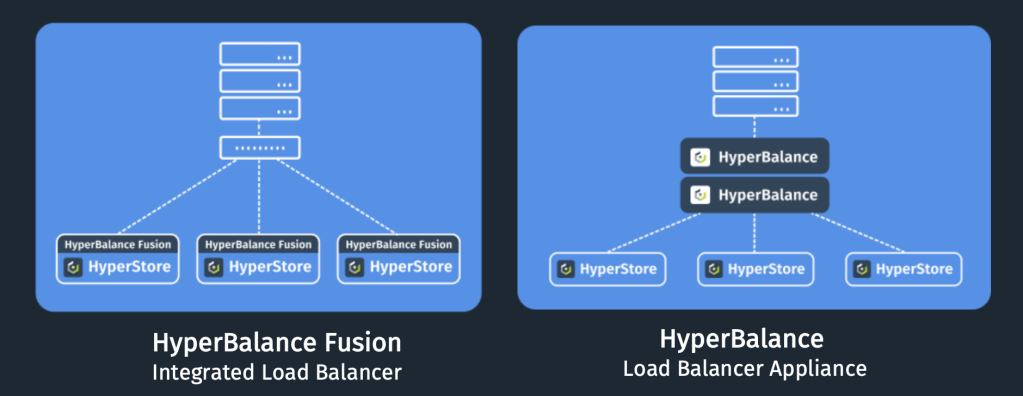
HyperBalance™ Fusion takes a different approach. It is load balancing fully integrated into the Cloudian HyperStore® platform. It runs on every storage node, sees the live health and workload of every node, and routes clients accordingly. There is no separate load balancer to buy, size, or operate.
This post looks at where the common approaches fall short for object storage, how Fusion works, and when Cloudian’s own HyperBalance Appliance is the better fit.
Where plain DNS falls short
Round-robin DNS is free and simple, but it was never designed for load balancing.
- No health or load awareness. DNS returns the address of a node that is down, overloaded, or in maintenance, and its rotation ignores how busy each node actually is.
- Caching skews distribution. Resolvers, operating systems, and applications often hold answers longer than the TTL. A large resolver can send thousands of clients to the same answer.
- Manual upkeep. Records are added by hand, every expansion means a DNS change, and multi-site routing depends on split-horizon DNS or views that someone has to configure and maintain.
Some widely used applications make this worse. Veritas NetBackup caches DNS answers inside the application and ignores TTLs. Veeam holds a single persistent connection. Either way, traffic piles up on one node.
General-purpose load balancers: capable, but blind to storage
A dedicated load balancer fills the gaps that DNS leaves, and there are several ways to get one. Commercial appliances bring hardware, HA pairs, support contracts, and often throughput or GSLB licensing. Open-source proxies such as HAProxy, NGINX, and Envoy are excellent general-purpose tools; They carry no license fee, but you build, run, and patch them yourself. Kernel-level options such as LVS/IPVS with Keepalived, or MetalLB on Kubernetes, demand deep Linux skills. Cloud load balancers pointed at on-prem storage bring their own load balancer and egress charges.
These options differ in cost, but they share the same limitations when placed in front of object storage:
- No view of node load. Health checks can confirm that a node’s S3 service responds, but a generic load balancer has no insight into how busy each node is. Distribution follows connection counts or rotation, not actual workload, and storage-specific checks have to be built and maintained by someone.
- Manual topology management. Every node added, removed, or replaced is a configuration change.
- A tier to scale. Proxy-based load balancers sit on the data path, so their capacity becomes the ceiling for the cluster. Growing the storage means growing the load balancer tier too.
- Separate ownership. The network team usually owns the load balancer, so storage changes become cross-team tickets.
How HyperBalance Fusion works
Fusion is software that runs on every HyperStore node. It acts as the authoritative DNS for your S3 endpoints, so setup takes only a few NS records in your existing DNS. Fusion then answers each client query using live knowledge of the cluster.
- Health checks from inside the cluster. HTTP-level checks reflect the status of HyperStore services on every node. The checks run distributed across all nodes, so the work of running hundreds of them is spread evenly rather than concentrated on one device.
- Load-based weighting. Fusion sees each node’s actual workload and uses it to steer clients toward less-busy nodes, not simply the next node in rotation.
- Automatic topology updates. New nodes, failed services, and expansions are published without editing DNS or load balancer configs. A standby mode keeps newly added nodes invisible to clients until you choose to expose them.
- DNS-based HA. Fusion runs active-active across nodes, or in failover mode for DR, with no extra components.
Once a client has its answer, it connects directly to that storage node. With no proxy tier in between by default, throughput scales with the cluster, and there is no separate appliance, VM, or third-party license to buy, size, or refresh.
What about DNS caching?
Fusion is DNS-based, so it is fair to ask how it avoids the caching problems described above. There are two parts to the answer. First, Fusion controls the TTL on its own answers, so well-behaved clients re-resolve often and pick up changes in node health and load. Second, for clients that ignore the TTL or hold on to a single connection, Fusion offers relay. HyperStore 8.2.9 also adds an optional single-answer mode for Linux clients whose resolvers reorder multi-address DNS answers and concentrate traffic on one node.
Relay: balancing traffic even when clients don’t cooperate
Relay, available from HyperStore 8.2.8, adds a lightweight proxy on every node. When a node becomes busier than its peers, it transparently forwards incoming requests to less-busy nodes, by default within the same data center. Clients need no changes.
Relay was originally built for the two classic problem cases, which have different root causes. NetBackup caches DNS answers and ignores TTLs, which is a DNS problem. Veeam pins a single persistent connection, which is not a DNS problem at all. Relay corrects both by shifting requests away from busy nodes.
Relay adds value for every client, not just these two:
- Resilience to S3 service issues. If the S3 service on a node fails, runs out of memory, or restarts, relay re-routes connections to S3 on other nodes. Relay itself is far lighter than the S3 service and reloads gracefully in a fraction of a second.
- Scale that grows with the cluster. Each node runs its own relay instance, so relay capacity grows as you add nodes. There is no central proxy tier to size.
- Simple TLS. Relay needs no certificate management beyond the usual import of S3 certificates.
Two practical notes. When a request is relayed, the node that receives it is in the data path for that request; requests that are not relayed go directly to the storage node. TLS processing also uses CPU on the storage nodes, handled by relay in L7 mode or by the S3 service in L4 mode, and kernel-level TLS keeps that work in the kernel where it is enabled.
Native multi-site, multi-tenant, and secure
Multi-data-center traffic management is where generic load balancing gets most expensive. True multi-site routing usually means adding a GSLB product, such as F5 BIG-IP DNS, on top of local load balancers. Fusion delivers it natively.
- Data center affinity. By default, clients are routed to the data center of the node that answers their DNS query. Optional subnet rules let you map client subnets to preferred data centers explicitly. Cross-site traffic happens only when the local site cannot serve the request.
- Active-active across sites. Each site serves its own clients and backs up the others. If services fail in one site, traffic shifts to the healthy sites automatically and returns when the site recovers.
- Configurable address mapping. Fusion can publish routable edge addresses in DNS while internal node addresses stay private, either per node (1:1) or per data center (GSLB).
- Multi-VLAN and multi-tenancy. Per-tenant VLAN affinity rewrites DNS answers to each tenant’s own node interfaces, a natural fit for service providers and neoclouds.
For service-provider and DMZ designs, address mapping works with DNAT at the edge, while the HyperStore Firewall enforces per-service ACLs and a default-deny posture at each node. The cluster’s actual topology is never exposed. Fusion runs entirely inside the cluster with no outside dependencies, so it also suits dark sites, and it requires no additional firewall ports.
Owned by the storage team, managed in one place
Because Fusion is part of HyperStore, the team that runs the storage also controls how traffic reaches it. Expanding the cluster, taking a node down for maintenance, or tuning routing no longer needs a ticket to another team.
With HyperStore 8.2.9, Fusion is configured from the Cluster Configuration page in the Cloudian Management Console (CMC). With HyperIQ 2.4, expanded Fusion metrics are enabled automatically when Fusion is on, showing how traffic is distributed. The same release roughly halved DNS convergence time on 50 to 80 node clusters and made relay health checks reliable under very high load.
| Plain DNS | Open-source proxy | Load balancer appliance | HyperBalance Fusion | |
| Cost model | None | No license fee; you build, run, and patch it | Hardware, HA pair, support, often throughput licensing | Part of HyperStore; no separate load balancer to buy or size |
| Health checks | None | Configurable; storage-specific checks are yours to build | Configurable; storage-specific checks are yours to build | HyperStore service checks, distributed across the cluster |
| Routing | Round robin | Round robin or least-connections | Round robin, least-connections, or weighted | Weighted by actual node workload, plus relay |
| Data path | Off path | On path (proxy tier) | On path in proxy mode | Off path by default; relay runs on every node |
| Topology changes | Manual DNS edits | Manual config change | Manual config change | Automatic |
| Multi-site | Manual (split-horizon / views) | Custom configuration | Usually a separate GSLB product | Native, with DC affinity |
| Who manages it | DNS admins | Whoever built it, often the network team | Network team | Storage team, in CMC |
When the HyperBalance Appliance is the right fit
Some environments genuinely need a dedicated inline Layer 4 and Layer 7 load balancer. For those, Cloudian offers the HyperBalance Appliance, which provides inline balancing, GSLB, or both, with HyperIQ integration. Fusion is validated for clusters up to 80 nodes and is the right choice for most HyperStore deployments. Choose the Appliance if you need enterprise load balancing features beyond HyperStore, require dedicated hardware separation, run clusters larger than 80 nodes, or operate complex multi-vendor infrastructure.
Choosing the right approach
Plain DNS is free but cannot see node health or load. General-purpose load balancers are capable tools, but they know nothing about the storage behind them and add a tier to build, license, or scale. HyperBalance Fusion is load balancing fully integrated into HyperStore. It knows each node’s health and workload, keeps clients on direct paths, handles applications that ignore DNS, and spans sites natively. And it automatically follows HyperStore’s topology and does not need any reconfiguration as a cluster grows.
For most HyperStore deployments, there is no separate load balancer to buy, size, or run. It is already part of the cluster.


