Top Kubernetes Storage Solutions
How we selected these tools: We shortlisted Kubernetes storage solutions based on their ability to provide persistent, scalable storage for stateful containerized workloads, including S3, block, and file support, data protection, and portability across on-premises and cloud environments.
Enterprise Storage Platforms
1. Cloudian HyperStore

Best for: S3-compatible object storage for Kubernetes at large scale
Strengths: High S3 compatibility, multi-tenancy, erasure coding
Things to consider: Monitoring interface has a learning curve; setup often needs support
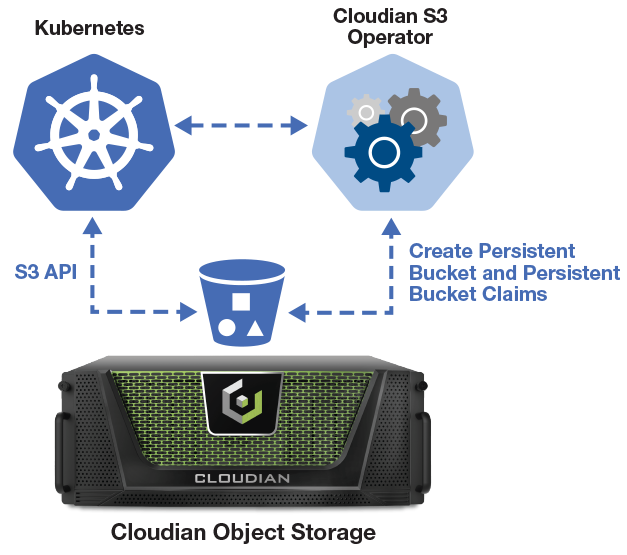
Cloudian HyperStore is a software-defined object storage platform that presents distributed storage as a single, flat S3 namespace. It runs on industry-standard hardware or Cloudian appliances and can be deployed on servers, virtual machines, or in the cloud. For Kubernetes workloads, applications reach HyperStore through the S3 API, using the same tools and code paths used with AWS S3.
The platform uses a shared-nothing, peer-to-peer architecture in which every node serves I/O, with no metadata server or central controller in the data path. Placement, replication, and lifecycle policies are set per bucket, and it supports both object and file data under one system.
Key features include:
- S3 API compatibility: HyperStore supports the full set of AWS S3 features and operations and uses the AWS S3 SDK. Applications provision and access buckets through standard S3 calls, which supports data migration and interoperability across hybrid and multi-cloud environments.
- Shared-nothing architecture: Every node in the cluster participates equally in serving I/O, with no head node or central choke point. Adding a node adds CPU, memory, network, and disk at the same time, and throughput scales alongside capacity.
- Security and data resiliency controls: HyperStore provides comprehensive protection through encryption in transit and at rest, KMIP, IAM, SAML integration, MFA, secure shell, and Object Lock for WORM retention. To ensure high availability, data fragments are distributed across nodes, racks, or data centers using erasure coding for failure recovery, alongside bucket-level replication options where lower latency is preferred over storage efficiency.
- Multi-tenancy with QoS: A single cluster supports many independent tenants, each with its own users, groups, IAM policies, and role-based access controls. Resources are pooled and allocated dynamically, per-tenant QoS controls set throughput and request-rate limits, and per-user metering produces usage records for chargeback.
- AI data platform: Integrates advanced AI capabilities directly into the storage architecture. It enables automated data insights, optimized workload management, and intelligent data profiling, transforming standard object storage into an active, AI-ready data infrastructure.
- Multi-site management: Distributed infrastructure across data centers, edge sites, and cloud regions is managed as one system through one set of credentials and one management plane, with synchronous, asynchronous, or cloud-tiering policies applied per bucket.
Limitations (as reported by users on G2):
- Monitoring and reporting: Some users note that the interface for monitoring and reporting is not always intuitive and can take extra steps to locate specific details.
- Advanced configuration: Reviewers mention that advanced configurations can require additional documentation or hands-on support.
- Getting started: Some users point to the absence of a self-service free trial, noting that initial setup can involve working with the support team.
2. MinIO

Best for: High-performance S3-compatible object storage for AI and analytics
Strengths: S3 compatibility, exabyte-scale namespace, AI integration
Things to consider: Documentation gaps; administration needs engineering expertise
MinIO AIStor is a software-defined, S3-compatible object store built for AI and analytics workloads. It stores structured and unstructured data in a single flat namespace that scales from petabytes to exabytes, and runs across edge, core, and cloud environments. It is native to Kubernetes and deploys as containers, which lets teams run S3-compatible storage on-premises with the same tools and code used against cloud object storage.
AIStor connects to data pipelines through the S3 API and additional protocols, and integrates with common AI and analytics frameworks.
Key features include:
- Protocol support: AIStor exposes the S3 API along with S3 Express, SFTP, an Iceberg catalog, and OpenSharing interfaces, so objects, tables, and files can be accessed through standard and AI-native interfaces.
- Data resilience and replication: The platform provides replication, versioning, object immutability, and data resilience features to protect data and keep multiple copies across locations.
- Encryption and key management: AIStor includes encryption, a key management server, and anti-ransomware controls, together with identity and access management for authentication and authorization.
- Administration and multi-tenancy: It supports multi-tenancy along with administration, traffic management, and observability tools to monitor, administer, and scale storage infrastructure.
- AI ecosystem integration: AIStor connects with frameworks such as PyTorch, TensorFlow, Spark, and Apache Iceberg, and supports table and object data stores for data lakehouse workloads.
- Software-defined deployment: AIStor runs on edge, core, or cloud without dependence on specific hardware, using a flat namespace that sustains performance as data grows to exabyte scale.
Limitations (as reported by users on G2):
- Documentation gaps: Users report that administration can be difficult at times due to gaps in documentation, which requires engineering expertise on the team.
- Occasional stability issues: Some users describe intermittent availability of APIs and services under certain conditions.
- Management and cost challenges: Reviewers note it can be harder to manage than a fully managed cloud object storage service, can be cost-prohibitive, and some report extra effort to configure high availability and to migrate from other S3 systems.
3. Portworx

Best for: Enterprise data management for stateful Kubernetes apps and VMs
Strengths: Automated storage ops, HA, backup and disaster recovery
Things to consider: Configuration complexity; multi-component architecture learning curve
Portworx Enterprise is a Kubernetes-native data platform for running stateful applications and virtual machines on containers. It provides persistent storage across hybrid, multi-cloud, and on-premises deployments, and works with widely used Kubernetes distributions including Red Hat OpenShift, Amazon EKS, Azure AKS, Google Kubernetes Engine, and SUSE Rancher.
The platform aggregates underlying storage into a shared pool and provisions volumes through Kubernetes workflows. It automates storage operations such as provisioning, scaling, and volume placement, and adds capabilities beyond a basic CSI driver.
Key features include:
- Automated storage management: Portworx dynamically balances, scales, and resizes storage using a built-in rules engine, applies thin provisioning, and places volumes with affinity and anti-affinity rules. It can migrate applications and data across clusters, racks, and clouds.
- Application performance controls: The platform provisions and attaches volumes within milliseconds and tunes I/O paths for individual applications and volumes, with high availability across multiple data centers.
- Developer self-service: Developers can provision storage on demand across on-premises, public, or hybrid environments and integrate storage with CI/CD toolchains, using snapshots to speed incremental builds.
- Security and access control: Portworx provides granular role-based access control for cluster and volume operations, volume encryption integrated with key management servers, and management through a UI, API, or CLI. It is SOC 2 and ISO 27001 compliant.
- Backup and disaster recovery: Portworx offers container-granular, application-aware backup and disaster recovery, with synchronous and asynchronous replication for business continuity.
- Broad Kubernetes integration: It runs on the major managed and self-managed Kubernetes platforms and integrates with FlashArray and other underlying infrastructure.
Limitations (as reported by users on G2):
- Configuration complexity: Users report that setup and configuration can be complex, particularly for teams less familiar with container storage.
- Architecture learning curve: Reviewers note that understanding the multi-component architecture is needed to deploy and troubleshoot the platform effectively.
- Support experience: Some users describe early support interactions as less responsive, while noting that this improved over time.
Open Source Container-Native Storage
4. OpenEBS

Best for: Container-native storage with multiple engines per workload
Strengths: Multiple storage engines, userspace operation, thin provisioning
Things to consider: Multi-engine management overhead; local engines are not HA
OpenEBS is an open source container-native storage solution that provides persistent storage for Kubernetes workloads. It provisions storage dynamically using containerized storage controllers and offers two main approaches: Local Storage, which uses direct node storage, and Replicated Storage, which synchronously replicates data across nodes. Most of its storage engines are CSI compliant.
OpenEBS is structured as an umbrella of sub-projects, including Local PV Hostpath, Local PV ZFS, Local PV LVM, and the Mayastor replicated engine. Local Storage suits applications that manage their own replication, while Replicated Storage suits workloads that need storage-level replication and high availability.
Key features include:
- Multiple storage engines: OpenEBS provides several engines under one project, including Local PV Hostpath, Local PV ZFS, Local PV LVM, and Mayastor, so teams can match a storage engine to each workload.
- Local and replicated storage: Local Storage provides near-disk performance with minimal overhead but is tied to a single node, while Replicated Storage synchronously replicates data across nodes and uses NVMe-oF semantics for low-latency access.
- Snapshots, clones, and backup: When backed by filesystems such as LVM or ZFS, OpenEBS supports snapshots and cloning, and it supports backup and restore through Velero.
- Userspace operation: OpenEBS runs entirely in userspace rather than depending on the Linux kernel, which affects how it is deployed and maintained across environments.
- Thin provisioning: The project supports dynamic allocation of storage through thin provisioning and allows storage to be expanded on the fly.
- Cloud portability: By abstracting storage management, OpenEBS supports moving data across Kubernetes environments on-premises or in the cloud, reducing dependence on a single cloud provider.
Limitations (based on publicly available sources):
- Multi-engine complexity: OpenEBS is a collection of storage engines rather than a single system, so teams must select and standardize on an engine per workload and manage each one, which adds operational overhead.
- Local engines are not highly available: Local Storage is limited to the node where the volume is provisioned, so a node failure leads to data unavailability for that volume.
- Resource requirements for replication: The replicated engine requires sufficient CPU, RAM, and NVMe resources to reach its intended performance.
- Operational responsibility: With the flexibility of multiple engines, upgrading engines, keeping custom resource definitions in sync, and setting up observability fall to the operating team.
5. Rook

Best for: Automating Ceph block, file, and object storage on Kubernetes
Strengths: Kubernetes operator for Ceph, self-managing, multi-protocol
Things to consider: Carries full Ceph operational overhead; needs deep expertise
Rook is an open source storage orchestrator that turns distributed storage systems into self-managing, self-scaling, and self-healing services on Kubernetes. It runs as a Kubernetes operator for Ceph and automates storage administration tasks including deployment, bootstrapping, configuration, provisioning, scaling, upgrading, migration, disaster recovery, monitoring, and resource management. It is a Cloud Native Computing Foundation graduated project.
Rook uses Kubernetes to deliver Ceph storage, providing file, block, and object storage from one system. Storage resources are defined in YAML, and Rook handles provisioning and lifecycle management using Kubernetes-native tools.
Key features include:
- Ceph operator: Rook orchestrates Ceph through a specialized Kubernetes operator that automates deployment and management, running Ceph on Kubernetes and handling day-to-day storage tasks.
- File, block, and object storage: Rook provisions file, block, and object storage from the same Ceph cluster, covering multiple storage types through a single orchestrator.
- Automated storage administration: It automates provisioning, scaling, upgrading, migration, disaster recovery, monitoring, and resource management, which reduces manual storage administration steps.
- Data distribution and replication: Rook distributes and replicates data across the cluster to reduce the risk of data loss, and supports hyper-scale or hyper-converged cluster configurations.
- Cluster management and monitoring: Rook manages cluster resources and integrates with monitoring so operators can track cluster health and resource status, running on commodity hardware under the Apache 2.0 license.
Limitations (based on publicly available sources):
- Operational complexity of Ceph: Running Rook means taking on the operational overhead of Ceph, including tuning monitors, managing OSDs, handling upgrades, and debugging across layers.
- Required expertise: Troubleshooting effectively often requires deep knowledge of both Kubernetes and the underlying Ceph system.
- Resource intensity: Ceph daemons carry significant CPU and memory requirements, and setting resource limits too low risks pods being terminated and potential data loss.
- Upgrade and recovery complexity: Upgrade and recovery processes can become more complex as the cluster grows in scale.
6. Longhorn

Best for: Simple distributed block storage for small to mid-sized clusters
Strengths: Easy deploy, snapshots and backups, cross-cluster DR, free UI
Things to consider: User-space I/O path limits high-IOPS performance
Longhorn is an open source, cloud-native distributed block storage system for Kubernetes. It runs entirely as microservices inside the cluster and does not require an external storage array. Each volume gets its own storage controller and a set of replicas, and Longhorn replicates volume data across nodes to provide highly available persistent storage. It is a CNCF Incubating project originally developed by Rancher.
Longhorn provides persistent block storage that installs and upgrades without the cost overhead of open core or proprietary alternatives, and it includes a management interface for provisioning and monitoring storage.
Key features include:
- Distributed block storage: Longhorn delivers cloud-native persistent block storage for Kubernetes, running as microservices and replicating volume data across cluster nodes for availability.
- Incremental snapshots and backups: Built-in incremental snapshot and backup features keep volume data safe inside or outside the cluster, and backups can be scheduled through the management UI.
- Cross-cluster disaster recovery: Longhorn can create a disaster recovery volume in another Kubernetes cluster and fail over to it, letting teams bring up an application in the DR cluster with a defined RPO and RTO.
- Management UI: Longhorn provides a management interface for creating, scheduling, and monitoring storage operations, including scheduled backups of persistent volumes.
- Run anywhere: Longhorn is fully open source and runs across cloud-hosted and non-cloud-hosted Kubernetes clusters, including clusters that would otherwise lack persistent storage support.
Limitations (based on publicly available sources):
- User-space replication overhead: Longhorn’s replication engine runs in user space, which adds CPU cost and latency compared with kernel-path storage protocols.
- Performance under high I/O: Under sustained high-IOPS or latency-sensitive workloads such as databases, the user-space data path can become a bottleneck.
- Slow replica rebuilds: Rebuilding a failed replica copies the full volume across the network, which can take time for large volumes and temporarily reduces redundancy.
- Storage coupled to compute: As a hyper-converged system, storage capacity is tied to the compute nodes, so scaling storage independently from compute is not straightforward.